Friday, December 12, 2014

Oracle Field Service - An Overview

Oracle Field Service (formerly Service Online) automates the process of dispatching field technicians to service calls in remote locations by:

  • Providing a centralized view and point of control for monitoring Field Service activities to increase productivity and reduce costs.
  • Ensuring adequate staffing and on-time arrival of field service personnel for improved customer satisfaction.
  • Diagnose symptoms and potential resolution for service calls before dispatching field service resources to prevent unnecessary service calls.
FS has 3 main components >>

  1. Dispatch Center (DC)
  2. Administrator Portal (FSAP)
  3. Technician Portal (FSTP)

Dispatch to Debrief process:

Part of 'Service Request to Resolution Process'.

Receive SR >> Create FS Task >> Schedule FS Task >> Commit FS Task >> Execute FS Task >> Debrief FS Task >> Close Task & SR

Debriefing involves updating:


  • Time used
  • Parts used and recovered
  • Expenses incurred
  • Counter readings
  • Resolution documentation

Tuesday, December 9, 2014

Oracle Install Base

Oracle Install Base (IB) is an item instance life cycle tracking application.

Mark item as Install Base Trackable in Oracle Inventory and when item instance is created, it's created in IB (CSI_ITEM_INSTANCES) and further changes traced (CSI_TRANSACTIONS, CSI_ITEM_INSTANCES_H). Traced from the time it's received in inventory.

Usually serialized items, When a trackable item is defined in Oracle Inventory as non-serialized, it is typically for smaller objects (can be tracked only as a group) whose real-world instances do not require individual tracking e.g. screw.

Items can be serialized at receipt or at sales order issue.

Oracle Install Base interacts with: 

  • Oracle PO (PO receipt --> Update Inv Data --> IB created or changed), 
  • Oracle WIP (Issue components --> Complete work order --> Update Inv Data --> IB created or changed),
  • Oracle OM (),

To find the Installation Details for a Sales Order number:

select ctld.*
from csi_t_transaction_lines ctl,
csi_t_txn_line_details ctld
where ctl.transaction_line_id = ctld.transaction_line_id (+)
and ctl.source_transaction_id in
(select line_id from oe_order_lines_all where header_id=
(select header_id from oe_order_headers_all
where order_number = ))

Wednesday, November 19, 2014

Purge Obsolete Workflow Runtime Data


This concurrent program (FNDWFPR) purges obsolete runtime information associated with work items, including status information, any associated notifications, and, if the ECX: Purge ECX data with WF profile option is set to Y, any associated Oracle XML Gateway transactions. By default, it also purges obsolete design information, such as activities that are no longer in use and expired ad hoc users and roles, and obsolete runtime information not associated with work items, such as notifications that were not handled through a workflow process.

Parameters:
  1. Item Type - The item type to purge. Leaving this field blank defaults to purging the runtime data for all item types. Eg POAPPRV, OEOL
  2. Item Key - The item key to purge. Leaving this field blank defaults to purging the runtime data for all item keys.
  3. Age - Minimum age of data to purge, in days. The default is0.
  4. Persistence Type - The persistence type to be purged, either Temporary or Permanent. The default is Temporary
  5. Core Workflow Only - Enter 'Y' to purge only obsolete runtime data associated with work items, or 'N' to purge all obsolete runtime data as well obsolete design data. The default is 'N'.
  6. Commit Frequency - The number of records to purge before the program commits data. To reduce rollback size and improve performance, set this parameter to commit data after a smaller number of records. The default is 500 records.
  7. Signed Notifications - Enter 'N' to preserve signature evidence, including notifications that required electronic signatures and their associated signature information. Enter 'Y' to purge signature-related information. The default is 'N'.

Thursday, August 7, 2014

Oracle Service Contracts - An Overview

Oracle Service Contracts (Service Agreements) are contracts that are usually sold to customers to support, repair and/or maintain some product or service that the customer owns.


Service Contracts provides inputs to modules like Tele Services, Field Services, Depot Repair, iSupport. 

Monday, May 19, 2014

Oracle ASCP Programs


  • Push Plan Information

This concurrent process deletes an entire plan on the source instance and then replaces it with a copy of the current plan from the destination instance.

Prerequisites: A plan that has been run successfully.

Parameters:
Instance
Plan Type
Plan Name
Buy Orders Only: The default is No.
Demand: If you select Yes, the process purges and re-populates table 
mrp_gross_requirements with requirements from the plan. If you select No, the process leaves the data in table mrp_gross_requirements. The default is Yes.
Organization Code: The list of values contains the planned organizations of the selected
plan.
Planner: The list of values contains the planners of the items planned in the selected 
plan.
Category: The list of values contains the categories in the default planning category set.
Item: You can select a specific item. If you leave this parameter blank, the process 
pushes information for all items planned in the selected plan.
Supplier: The list of values contains the suppliers in the plan assignment set. You can 
select a value for this parameter only if:
• Buy Orders Only is Yes
• Demand is No
Supplier Site: The list of values contains the supplier sites in the plan assignment set. 
You can select a value for this parameter only if:
• Supplier has a value
• Demand is No
Horizon Start Date: The earliest Suggested Due Date for which you want plan 
information pushed. If you leave this parameter blank, the process begins with the plan 
start date.
Horizon End Date: The latest Suggested Due Date for which you want plan information
pushed. The default is one year from today. If you leave this parameter blank, the 
process ends with the plan horizon.

Example 1: Minimal Criteria
Settings:
• Buy Orders Only: No
• Demand: Yes
• Organization, Planner, Category, Item, Supplier, Supplier Site, Horizon Start Date, 
Horizon End Date:
The process:
• All supplies and demands from the selected plan in the source instance are deleted.
• All supplies and demands from the selected plan in the destination instance are 
copied to the source instance


Wednesday, May 14, 2014

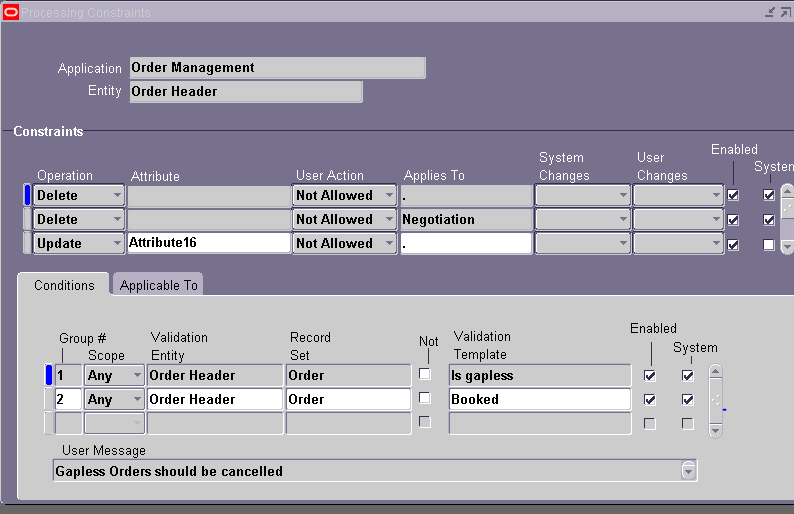
Processing Constraints

Orders in OM can be influenced in many ways like Workflow controls, Defaulting rules, Processing constraints.

Processing Constraints define whether a change is allowed to an order after certain activities have been completed, as well as level of responsibilities required to make the change. It prevent changes being made to order information when commitments have been made and communicated.

It has 2 main parts – action that you would like to prevent from happening and condition or state after which you want to prevent it. The condition can be in via workflow, column value in a table or through a PL/SQL package.

Navigation


Setup à Rules à Security à Processing Constraints


Monday, May 12, 2014

Product Information Management

Production Information Management (PIM) systems available (from):

  1. SAP
  2. Oracle (under Oracle MDM)
  3. Stibo Systems
  4. Hybris
  5. Riversand
  6. Heiler
  7. Enterworks
  8. WebOn
  9. Agility
  10. PCS (from Pegasystems)